
Now You Can Edit Your Website Right Where You See It
· 4 min read
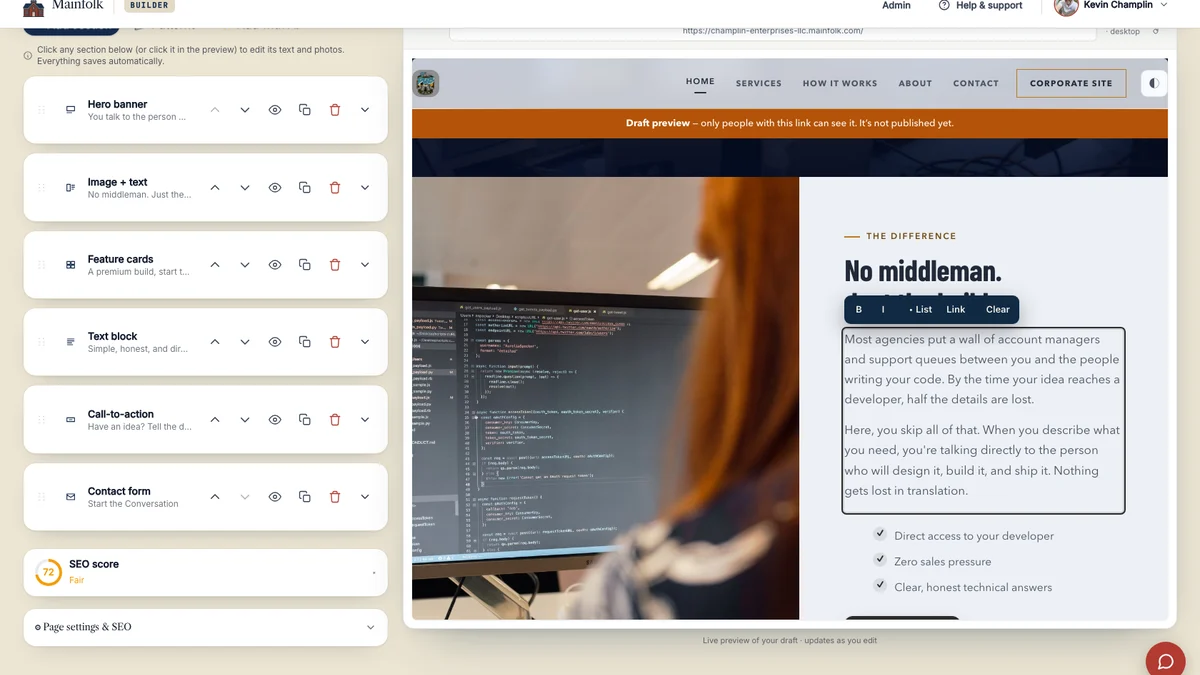
Editing your Mainfolk site used to work like this. You found the section in the list on the left, opened it, found the right box, and typed. The preview on the right showed you the result a moment later. It worked, but it asked you to hold two pictures in your head at once: the form you were filling in, and the page it was going to become.
You do not have to do that any more. Click a headline, a paragraph or a label on the preview and start typing. What you are looking at is what you are editing.
How it works
Move your pointer over text on the right side of the editor and you get a cursor, the same one you get in any document. Click and type. Press Enter to save a headline, or just click somewhere else. Press Escape if you change your mind, and the words you started with come straight back.
Longer body text gets a small toolbar above it for bold, italic, bullet points and links. Photos work differently, on purpose. Click a photo and the panel on the left opens that photo's picker, because choosing a picture properly needs more room than a blinking cursor can give you.
Blank spots are not invisible any more either. An empty heading shows a faint "Add a heading" prompt, so you can fill in a section you have just added without having to guess where the words are meant to go.
Nothing goes live until you say so
Everything you type on the preview is saved to your draft, not to your website. Visitors carry on seeing the version you last published. When you are happy with it, you press Publish, and not a moment before.
If you type something you did not mean to, Undo covers it, exactly like every other change in the editor. And if you paste text in from Word or from another website, the formatting is stripped out on the way in, so a stray font or a surprise heading cannot pull your layout apart.
Your live website carries none of this
This is the part people ask about, so it is worth saying plainly. The editing tools exist only inside your own preview, the one behind your login. The website your visitors load does not contain that code at all. There is nothing on your public pages for a stranger to click into, poke at or type in, and there never has been.
Every word you save is also checked on our side before it is stored, not only in your browser. That is what stops an odd paste or a broken tag from quietly becoming a broken page.
The idea behind it
We keep coming back to the same test. Could somebody who has never built a website do this on a Tuesday evening, without ringing anyone for help? A lot of website tools answer that by adding another panel, another menu, another setting to learn. We would rather take steps away.
Clicking the thing you want to change is about as few steps as there are. That is the direction we will keep pushing, and we would rather move carefully than ship something clever that leaves you nervous about touching your own website.
Where it works today
Inline editing is on for every Mainfolk site right now. There is nothing to switch on. It covers the blocks most sites are actually built from: hero banners, text blocks, calls to action, feature cards, image and text sections, contact forms, two column layouts, value cards, galleries and headings.
A handful of the more specialised blocks still open the panel on the left, and lists of cards are still edited there too, because a list needs proper controls rather than a cursor. Those are next on our list.
Open any page in your editor and try it. Click a headline. Type something. That really is the whole thing.